

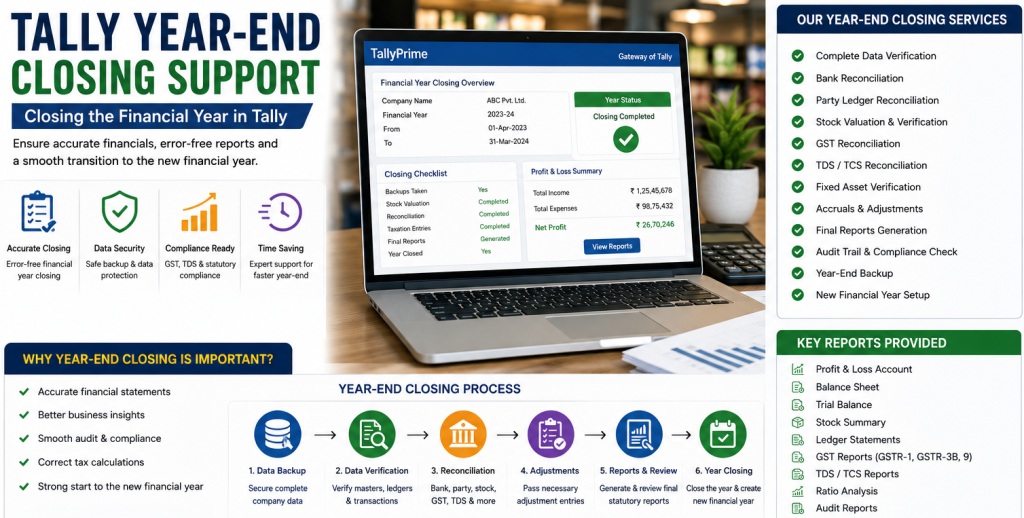
Tally Year-End Closing Support – Closing the Financial Year in Tally
The year end is one of the most important times for any business. The year end involves closing down accounts, checking for compliance, producing reports and setting up the system for the next year. For companies who use TallyPrime, a good year-end closing is very important to keep their financial records accurate and consistent.
Our Tally Year-End Closing support service will assist you through each stage of the year-end process from the closing entry to backing up your data and preparing for the new year. This comprehensive document details everything you should know about year-end closing in Tally.
Table of Contents
ToggleWhat is Tally Year-End Closing?
Closing the year in Tally is when you close off all of the financial transactions for the previous year and set up the system for the coming year.
Unlike other accounting systems, TallyPrime does not have an obligatory year-end closing. In fact, TallyPrime allows companies to:
- Work in the same company
- Access financial reports for various years
- Separate company data when needed
- Although closing the year is not obligatory, proper closing is important to achieve accuracy and compliance.
- Significance of Closing the Year in Tally
Year-end closing offers assurance that:
- Your financial statements are accurate
- Your tax is accurately calculated
- You comply with statutory requirements
- Your data is clean at the start of the new year
- You are able to plan your finances more successfully
If you do not perform year-end closing properly, you could experience problems with your financial reporting, tax and audits.
Pre-Year-End Checklist
Prior to commencing the year-end process in Tally, you should have done the following:
Complete All Entries
- All sale and purchase transaction have been entered
- All expense and revenue entries have been made
- Journal entries have been updated
Reconcile Accounts
- Bank account reconciliations
- Accounts payable and accounts receivable reconciliations
- GST reconciliations
Verify Stock Levels
- Check stock levels
- Compare physical stock quantities against Tally records
- Correct any discrepancies
Review Grouping of Ledgers
- Review groupings of ledgers
- Review for any incorrectly posted entries
- Review ledger balances
Review GST Compliance
- Check that all returns were filed
- Review the calculation of taxes
- Review your GST reports for accuracy
Step-by-Step Guide to Closing the Year in Tally
Features for Closing the Year in TallyPrime
TallyPrime makes closing the year much easier with:
- Flexibility in managing the financial year
- Automatically carry forward balances
- Easily split company data
- Generate reports instantly
- Provide GST compliance assistance
These features greatly reduce the complexity of the financial year closing process.
Common Problems Experienced When Closing the Year
Businesses often encounter difficulties in completing the year-end closing process due to:
- Data Errors
- Incorrect entries affect reports.
- Unreconciled Accounts
- Inconsistencies in bank or GST data.
- Missing Transactions
- Inadequate records result in inaccurate statements.
- Discrepancies in Stock
- Differences between actual and recorded stock quantities.
- Non-compliance with Regulations
- Incorrect tax calculations or filings.
- Expert support helps solve these problems.
Benefits of Engaging Professional Tally Year-End Closing Services
Accurate Financial Reporting
Ensure that all financial reports are accurate and reliable.
Assurance of Compliance
Ensure that you meet all GST and tax obligations.
Step 1: Back Up Your Data
Before you begin to make any alterations, back up all of your data completely.
- Go to Company Information
- Click on Back Up
- Save your data to a safe place
By doing this you will be able to retrieve your data in case something goes wrong.
Step 2: Review Financial Reports
Check some of the key reports:
- Trial Balance
- Profit and Loss Statement
- Statement of Affairs
Ensure that there are no inconsistencies.
Step 3: Enter Closing Entries
Make any necessary closing entries including:
- Entries for depreciation
- Entries for outstanding expenses
- Entries for prepaid expenses
- Entries for accrued income
These entries are necessary for accurate financial reporting.
Step 4: Close Your Books of Accounts
- Optional – lock the previous year’s books by using security controls
- Once closed, restrict any further amendments to the previously closed data
This will prevent accidental alterations.
Step 5: Set Up the New Financial Year
In TallyPrime you can either continue in the same company or split your company data.
Option 1: Continue in the Same Company
- Do not need to establish a new company
- Can simply change the year and view reports
Option 2: Split Company Data
- Go to Company Information > Split Company Data
- Select the date of closing e.g. 31st March
- Establish new data for the next year
Step 6: Carry Over Balances
Tally will automatically transfer over:
- Ledger balances
- Unpaid invoices
- Stock inventory
This provides continuity for the new year.
Key Closing Entries in Tally
It is also important to make the correct closing entries to ensure accurate accounts.
Depreciation Entry
Record depreciation of assets for the year.
Provisions Entry
- Provision for expenses
- Provision for bad debt
Outstanding Expenses Entry
Record any unpaid expenses for the year.
Prepaid Expenses Entry
Adjust any payments made prior to the year end for future expenses.
Accrued Income Entry
Record any income earned prior to the year end but has not yet been collected.
Inventory Adjustment
Adjust any discrepancies in stock quantities.
3.Save Time
Quickly and efficiently complete the year-end closing process.
4.Minimize Errors
Find and rectify discrepancies.
5.Smooth Transition to Next Year
Commence the new financial year without any issues.
Best Practices to Follow for Tally Year-End Closing
- Take several backups prior to closing
- Carefully review all reports
- Avoid entering any information late
- Use the audit facilities available in Tally
- Restrict users from accessing data after closing
- Keep detailed documentation
- Activities After Closing the Year
Following closing the year:
- Review Opening Balances
- Verify that all opening balances are transferred over correctly.
- Update Compliance Settings
- Update GST rates or tax laws when they change.
- Prepare for the New Year
- Develop budget and financial objectives.
- Provide Training
- Train your staff to understand any new procedures.
Why Select Our Tally Year-End Closing Support Services?
- Guidance from Experts
- Experienced professionals deal with complicated situations.
- Total Support
- From performing the pre-year-end checks to establishing the new year.
- Customized Solutions
- Designed to suit your business needs.
- Fast Service
- Efficiently complete the process.
- Continued Support
- Assistance is provided even after the closing of the year.
Protect Your Future Financial Management
Proper closing of the year is not merely about complying with regulations; it is about laying the groundwork for the financial year ahead. Businesses which utilize accurate data and structured processes are able to:
- Make better financial choices
- Manage cash flow more effectively
- Ensure compliance with regulatory bodies
- Improve operating efficiency
Conclusion
The closing of the year in Tally is a significant process, which enables businesses to maintain the integrity, consistency and reliability of their financial data. Each stage of the closing process – from passing closing entries to creating backups and preparing the system for the new year – is equally important.
Using professional Tally year-end closing services assists businesses to minimize errors, save time and smoothly transition into the new financial year. Regardless of whether you are a small business or large corporation, it is essential to follow the proper year-end closing procedures in TallyPrime to enable long term success.
If you are currently preparing for your year-end, we are here to provide you with the full extent of our expert Tally support services to assist you through the complete year-end closing process – both efficiently and accurately.