
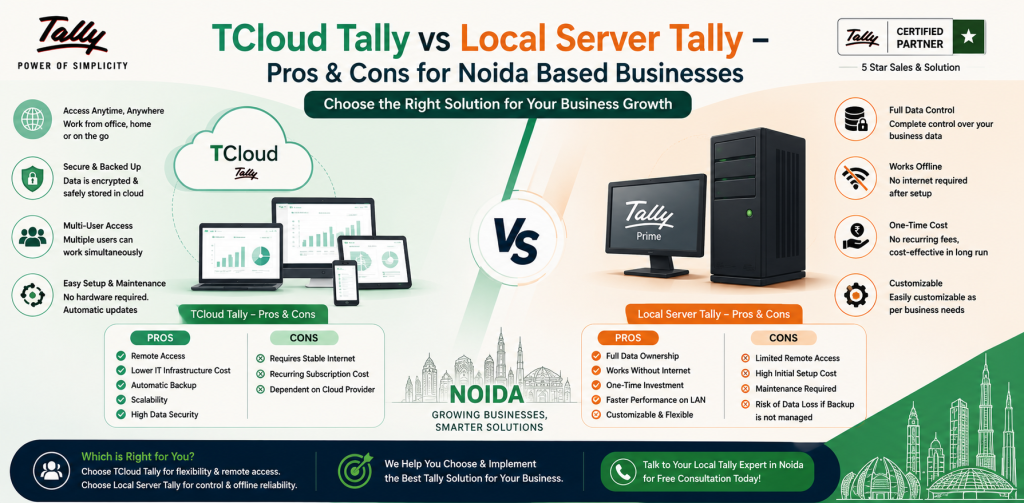
Cloud Tally vs Local Server Tally – Pros & Cons for Noida Based Businesses
Most businesses do not think about changing their Tally setup when everything is running smoothly. The discussion usually starts when small problems begin to repeat.
Someone needs a report while travelling. The accountant cannot access data after office hours. A CA asks for updated figures, but the latest data is available only on the office system. Backup files are shared back and forth, and no one is completely sure which file is the latest one.
That is usually when business owners start asking whether they should continue with Local Server Tally or move to Cloud Tally.
For Noida-based businesses, this is not only a technology decision. It affects daily accounting work, access to data, backup habits, cost, security, and how easily the business can manage future growth.
Both Cloud Tally and Local Server Tally can work well. The right option depends on how your business actually uses Tally every day.
Table of Contents
ToggleFirst, Understand the Basic Difference
In a local server setup, Tally and company data are stored on computers or servers inside the office. Users usually access the data through the office network. The business manages the hardware, backup, maintenance, and security.
In a cloud setup, Tally and its data are hosted on a remote server. Authorised users can access the same Tally environment through an internet connection. The software remains familiar, but the data is no longer tied to one office computer.
That is the practical difference.
Cloud Tally is mainly about access and reduced hardware dependency. Local Server Tally is mainly about direct control and office-based working.
One is not automatically better than the other. A small business with one accountant may not need cloud access. A growing company with multiple users may find a local setup restrictive.
Why Are Noida Businesses Comparing These Two Setups?
Noida has many small and mid-sized businesses, service firms, trading companies, manufacturing units, and professional offices. Many of them still use Tally because it fits regular accounting, GST work, inventory entries, and reporting needs.
The problem often appears when the team structure changes.
A business that earlier had one accountant sitting in the office may later need access for the owner, a second accountant, an external CA, or a branch team. The software may still be the same, but the way people need to access it becomes different.
This is where Local Server Tally can start feeling limited.
If the server is inside the office, access outside the office may require extra technical setup. If the office system is switched off, damaged, or unavailable, work can stop. If backups are not taken properly, recovery can become difficult.
Cloud Tally is considered in these situations because it allows authorised access from different locations. For some businesses, that solves a real daily problem. For others, it may only add a monthly cost without providing much benefit.
That difference matters.
How Cloud Tally Works in Daily Use
Cloud Tally does not change the basic purpose of Tally. Users still work with company data, vouchers, ledgers, reports, GST details, and accounting entries.
The change is in access.
Instead of depending on a local office system, users connect to a hosted environment. The owner, accountant, or authorised team member can access the system from another location, subject to permissions and internet availability.
Suppose a business owner is outside Noida and wants to check outstanding payments before calling a customer. In a local setup, they may have to call the accountant, ask for a report, and wait. With Cloud Tally, the owner can access the required report directly if permission is given.
This is useful when access delays affect decisions.
Another common situation is external accounting support. If a CA or consultant needs access during GST filing, audit preparation, or reconciliation work, cloud access can reduce the need to send backup files repeatedly.
Still, Cloud Tally should not be selected casually. The hosting quality, backup process, user access control, and support response are important. A poor cloud setup can create its own problems.
How Local Server Tally Works in Daily Use
Local Server Tally is familiar to many businesses. The company data stays inside the office infrastructure. Users work through office computers or a local network.
For a business where everyone works from one office, this can be simple and effective.
A small trading business with one accountant and one owner may not need remote access every day. If the accountant works from the same office and reports are reviewed there, a local setup can do the job.
The business also keeps direct control over its hardware and data location. Some owners are more comfortable with this because they know where the system is physically kept.
The responsibility, though, also remains with the business.
If the server fails, the company must handle repair or replacement. If backups are irregular, recovery becomes risky. If the system becomes slow, hardware upgrades may be required. Local control is useful, but it comes with maintenance responsibility.
Cloud Tally vs Local Server Tally: A Practical Comparison
Point of Comparison | Cloud Tally | Local Server Tally |
Access | Can be accessed remotely by authorised users | Mostly accessed within the office network |
Data location | Hosted on a remote server | Stored on office systems or local server |
Hardware responsibility | Lower dependency on office hardware | Business manages hardware directly |
Remote work | More convenient for users in different locations | Needs extra setup for remote access |
Backup process | Depends on cloud provider and selected plan | Business must manage backups |
Maintenance | Hosting environment handles server-side setup | Business handles local infrastructure |
Internet dependency | Requires stable internet access | Internet is less important for internal office use |
Best suited for | Multi-user, remote, or growing teams | Fixed office-based teams with simple access needs |
This table gives a broad comparison, but the final decision should be based on your workflow.
A company with five users working from different places will look at this differently from a shop with one accountant sitting in the office.
Access Is Usually the Main Deciding Factor
Most businesses do not move to cloud because they want a modern-looking setup. They move because access becomes inconvenient.
If the owner regularly needs reports outside the office, Cloud Tally can help.
If the accounting team works only from one location, cloud access may not make a major difference.
If a CA needs access occasionally, the business must decide whether occasional access is enough reason to shift or whether another arrangement will work.
This is where many businesses make mistakes. They compare features without looking at real usage.
A better question is:
Who needs Tally access, from where, and how often?
If the answer points to regular remote access, Cloud Tally becomes more relevant. If the answer is mostly “from the office only,” Local Server Tally may still be enough.
Backup and Data Safety Need Serious Attention
Tally data is not just another file on a computer. It may contain years of accounting records, customer balances, vendor details, tax-related entries, and financial reports.
With a local server, the business must make sure backups are taken regularly and stored safely. Keeping a backup on the same system is not enough if the system itself fails. Businesses should also know how quickly data can be restored if something goes wrong.
Many accounting disruptions happen because backups were ignored until the day they were needed.
Cloud Tally can reduce some of this burden, depending on the provider and plan. But it does not mean the business can stop asking questions.
Before choosing a cloud provider, ask:
How often are backups taken?
How does data recovery work?
Who controls user access?
What happens if a user leaves the company?
How quickly can support respond if access is interrupted?
These questions are not technical formalities. They directly affect business continuity.
Cost Should Be Compared Properly
Many businesses compare Cloud Tally and Local Server Tally only on visible cost. That can lead to a wrong decision.
A local server may seem cheaper if the company already owns computers and network equipment. But the total cost may also include maintenance, repairs, power backup, security tools, upgrades, and IT support.
Cloud Tally usually works on a service-based cost. The business pays for hosting and related services instead of maintaining its own server infrastructure.
Neither model is always cheaper.
For a small business with limited users, local setup may be more economical. For a business that needs remote access, multiple users, and lower hardware responsibility, cloud may justify its cost.
The right comparison is not only “monthly cloud fee vs server cost.” It should include convenience, maintenance responsibility, downtime risk, and future requirements.
Performance Depends on Setup Quality
Some businesses assume local is always faster because the server is nearby. Others assume cloud is always better because it is hosted online. Both assumptions can be wrong.
Local Server Tally performance depends on hardware condition, network quality, data size, and number of users. If the server is old or poorly maintained, speed can become an issue.
Cloud Tally performance depends on internet quality, server configuration, hosting reliability, and user load. If the internet connection is unstable, users may face interruptions.