
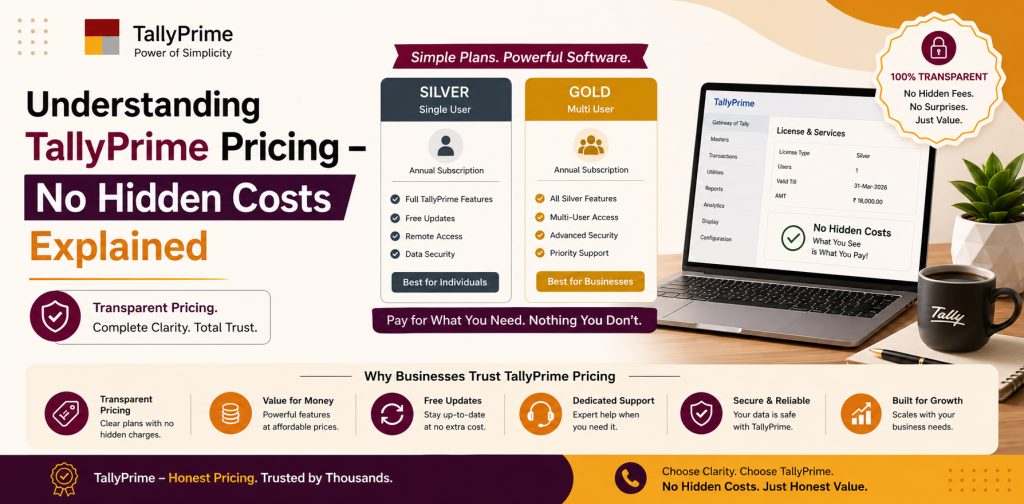
Understanding TallyPrime Pricing – No Hidden Costs Explained
India’s businesses are plagued with uncertainty regarding the pricing of accounting solutions. Most appear cheap at first glance, but have numerous unhidden costs that ultimately add to the overall cost of the investment. Therefore, the entire cost structure of TallyPrime should be understood prior to making any decisions.
Below we will discuss the details of TallyPrime’s pricing structure including licensing costs, AMC (Annual Maintenance Charge), customizing, cloud hosting, and any other associated costs. At the end of this article, you will know the total cost of Tally and how it is a cost-effective accounting solution for Indian businesses.
How Pricing Transparency Will Help Your Business
Budgeting is a significant part of a small to medium sized enterprise. When unexpected costs occur, this can disrupt your financial planning and lower your profitability.
Using a transparent pricing model will allow you to:
- Effectively plan your budget
- Avoid hidden costs
- Determine your Return On Investment (ROI)
- Confidently select the appropriate accounting software
TallyPrime has been recognized for years for its simple and transparent pricing structure, one reason for its widespread acceptance in India.
TallyPrime License Fee (One Time Payment)
The principal cost of TallyPrime is its license fee. Similar to buying a vehicle, TallyPrime uses a one time payment model rather than a subscription model similar to many other accounting software applications.
Types of Licenses:
- Silver License (Single User)
- This type of license is suitable for small enterprises.
- It can be utilized on one computer at a time.
- This is ideal for startup companies, freelancers and solo practitioners.
- Gold License (Multi User)
- This type of license is suitable for expanding businesses.
- This allows multiple users to utilize the application within a network environment.
- This is perfect for organizations that have accounting departments.
Pricing Insight:
Typically, the cost of TallyPrime in India will range from a few thousand rupees for the silver license version and go upward for the gold license version.
Primary Advantage:
Since you only pay once, you do not have to worry about paying a recurring monthly subscription fee which results in significant savings over the long term.
Comparison of Tally Software Costs vs. Subscription Based Software
There are many modern accounting solutions that use a monthly or yearly subscription model. Although these types of solutions may seem like a good value when they are first implemented, there are costs that continue to accumulate over time.
Comparison:
- Attribute TallyPrime Subscription Based Solutions
- Type of Payment Once a Month/year
- Cost Over Time Low High
- Ownership Type of license Access to application
- Product Update Type AMC Part of subscription
That is why so many businesses prefer TallyPrime because of the greater control it gives them over their costs.
Tally AMC (Annual Maintenance Charge)
Although you have purchased the license for TallyPrime on a one-time basis, you have the option of utilizing Tally Software Service (TSS), referred to as AMC (Annual Maintenance Charge).
AMC Features:
Features of the AMC include:
- Product updates
- Updates to comply with GST regulations
- Remote access
- Syncing of data
- Support services via internet
Cost Range:
The AMC is usually billed annually. As a result of the numerous benefits received, the AMC is generally less expensive than other software solutions.
Important Information:
AMC is not obligatory; however, it is highly recommended in order to remain compliant with changes to taxation law.
GST Compliance and Updates
Due to the constant changes in GST regulations in India, if you do not receive updates, you run the risk of being non-compliant and facing fines.
With TallyPrime:
- Updates to GST are included in the AMC
- Separate fees are not charged for updates to compliance with GST
- Automatically adapts to the latest GST regulations
Therefore, there are no hidden compliance costs associated with TallyPrime as you would experience with other software solutions.
Customization Fees
Each business has its own special requirements. Even though TallyPrime functions properly “out of the box,” many businesses will require some form of customization.
Examples of Customizations:
- Format of invoices
- Reports specific to your industry
- Work flow automation
- Integration with other systems
Factors that affect costs:
- Level of customization
- Charges from developers or partners
- Amount of time necessary to implement
Important Insight:
Customization is optional. It is completely dependent upon the needs of your business, therefore the costs of customization are variable.
TallyPrime Cloud Hosting Costs
Due to the increasing number of employees working remotely, many businesses are opting to host TallyPrime on the cloud.
Advantages of Cloud Hosting:
- Access to your data from anywhere
- Collaboration among locations
- Security and backing up of your data
- Less reliance on physical hardware
Cost Structure:
Costs of cloud hosting are usually monthly or annually. They are determined by:
- Number of users
- Requirements for storage
- Hosting provider
Important Information:
Cloud hosting is not a necessity. It is an optional service based on the needs of your business.
Initial Setup Costs and Implementation
Businesses that are new to accounting software may require professional assistance for initial setup.
Included in the Services:
- Setting up your company and configuring your data
- Setup of GST
- Migration of your existing data
- Setup of Chart of Accounts
Range of Costs:
- Low cost or included by partners for basic setup
- Dependent on complexity for advanced setup
Good News:
Bundled packages are often offered by consulting firms to reduce setup costs.
Training and Support Costs
Even though TallyPrime is user friendly, training can enhance its usage.
Available Training Options:
- Training for basic users
- Advanced accounting training
- Compliance and GST training
- Factors Affecting Costs:
- Number of users
- Level of training
- Training either onsite or remotely
Good News:
Free learning materials are available for basic learning options, thereby reducing training costs.
Data Backup and Security Costs
Protecting your data is important to all businesses. Although TallyPrime includes native security and backup features, businesses may elect to supplement with third party backup services.
Options:
- Backup of local data (very low cost)
- Third-party cloud backup services
- External storage devices
These costs are optional and dependent on the data protection policies of your organization.
Total Cost of Ownership (TCO) of TallyPrime
To fully comprehend the total cost of Tally, let us review the following factors:
One-Time Costs:
- Purchase of license
- Initial setup (optional)
Recurring Costs:
- AMC (annually)
- Cloud hosting (optional)
- Training and support (optional)
Unhidden Costs?
The greatest benefit of TallyPrime is that there are no required or mandatory hidden costs. Businesses only pay for what they choose to use.
- Sample Cost Scenarios for Small to Medium Sized Enterprises
Small Business:
- Silver License
- Basic AMC
- No Customization
Total Cost: Reasonably priced and predictable
Expanding Business:
- Gold License
- AMC
- Cloud Hosting
- Some Customization
Total Cost: Relatively moderate but scalable
Medium to Large Enterprise:
- Gold License
- Advanced Customization
- Cloud + Support Services
Total Cost: More costly, but aligns with your business needs.
Why TallyPrime Pricing is Considered Transparent
As opposed to many of its competitors, TallyPrime utilizes a clearly defined pricing model:
- No subscription requirements
- Add-ons are optional
- Clearly separated costs
- No hidden compliance costs
This transparency builds confidence and enables businesses to make more accurate financial planning decisions.
Key Advantages of the TallyPrime Pricing Model
- Cost effective for extended periods
- Flexible according to the size of your business
- Scalable as your business expands
- Transparency with no hidden surprises
- Accurate Return on Investment (ROI) due to increased efficiency
Conclusion
Before making a decision, it is imperative to understand the TallyPrime pricing model. From the one-time license fee to the optional AMC, customization, and cloud hosting, each component of the Tally cost breakdown is both flexible and transparent.
Not only does TallyPrime feature a variety of different functionalities, but it also presents an honest pricing model. Businesses only pay for what they need, making it one of the most cost-effective accounting solutions in India.
If you are seeking a reliable software solution with predictable costs and no hidden costs, TallyPrime is an excellent investment. By determining your business requirements and selecting the appropriate modules, you can minimize your Tally total cost and enjoy the power of accounting and compliance.