
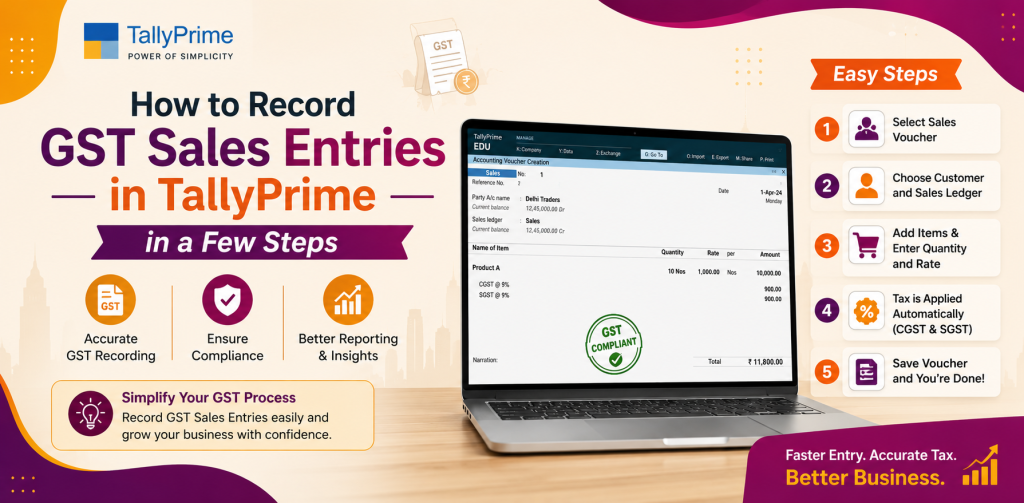
How to Record GST Sales Entries in TallyPrime in a Few Steps
Goods and Services Tax (GST) has been introduced into the accounting system for Indian Businesses. Recording GST compliant sales in TallyPrime, will allow you to make accurate calculations of taxes due to the Government and be able to file your returns without the risk of fines. Many businesses in the Delhi NCR and throughout India continue to encounter problems using the IGST, CGST and SGST functions in their accounting systems.
The purpose of this article is to provide a step by step guide for recording GST sales entries in TallyPrime, so that accountants, financial managers and business owners can easily document their sales and comply with the GST regulations.
Importance of Accurate GST Sales Entry
Accurate documentation of sales under GST is necessary for:
- Compliance: To avoid fines for filing incorrect GST returns.
- Transparency: To have accurate documentation for audits and inspections from regulatory bodies.
- Tax Calculation: To ensure that you calculate your IGST, CGST and SGST accurately.
- Financial Reporting: To obtain accurate reports of your revenue for future business planning purposes.
TallyPrime makes GST accounting simpler and allows you to produce GST compliant invoices with less than one percent error.
Understanding the GST Tax Structure in India
Prior to documenting GST sales in TallyPrime, it is important to understand the tax structure:
- CGST (Central GST): Levy on intra-state sales by the Central Government.
- SGST (State GST): Levy on intra-state sales by the State Government.
- IGST (Integrated GST): Levy on inter-state sales.
You will need to enter either CGST, SGST or IGST depending upon the type of transaction entered in TallyPrime.
Configure GST in TallyPrime
Prior to documenting GST sales entries in TallyPrime, you will need to configure GST:
- Go to Gateway of Tally → F11: Features → F3: Statutory & Taxation.
- Set Enable Goods and Services Tax (GST) to YES.
- Enter your GSTIN and Select the State where your Business is located.
- Save the Configuration.
Configuration will allow TallyPrime to automatically calculate GST for all sales transactions documented in TallyPrime.
Create GST Ledgers
You will need to create separate ledgers for CGST, SGST and IGST to record GST correctly:
- Go to Gateway of Tally → Accounts Information → Ledgers → Create.
- Enter Ledger Name (e.g. CGST 9%, SGST 9%, IGST 18%).
- Under, select Duties & Taxes → GST.
- Enter the Tax Rate for the Ledger (e.g. 9% for CGST).
- Save the Ledger.
You will also need to have separate ledgers for your customers and sales accounts to make the sales entry process smoother.
Create Stock or Item Masters
All items or services must have GST rates associated with them prior to selling them in order to comply with GST regulations:
- Go to Gateway of Tally → Inventory Information → Stock Items → Create.
- Enter Item Name and Select Under (e.g. Finished Goods or Service).
- Enter Unit of Measure and Opening Balance if applicable.
- Under Tax Classification, Select Applicable GST Rate (CGST + SGST or IGST).
- Save the Item.
This way GST will be automatically applied when you document a sales entry.
Document the Sales Entry
Once you have GST configured in TallyPrime, you can now document a sales entry:
- Go to Gateway of Tally → Accounting Voucher → F8: Sales.
- Select the Customer Ledger.
- Enter Invoice Number and Date.
- Select the Stock Item sold.
- Enter Quantity and Rate.
- TallyPrime will automatically calculate GST based on the Ledger and Item configuration.
For example: If you sell ₹10,000 worth of goods at 18% GST in Delhi, TallyPrime will automatically allocate CGST and SGST as follows:
CGST: ₹900
SGST: ₹900
If you are selling to a customer in a different state, TallyPrime will apply IGST instead of CGST/SGST:
Example: If you sell ₹10,000 worth of goods at 18% GST to a customer in Maharashtra, IGST will be: ₹1,800.
When you have completed entering all details, Press Enter to Save the Voucher.
Review Sales and GST Reports
TallyPrime allows you to view all sales and tax reports in real time:
- View GST Reports: Go to Display → Statutory Reports → GST → GST Sales to see IGST, CGST and SGST details.
- Check Invoice Register: To verify that the invoices were created correctly.
- Review Tax Liability Reports: To check that the tax amounts due to the Government are correct.
Regular reviews will ensure accurate tax filings and will prevent any discrepancies that may arise during audits.
Record Credit and Debit Notes
At times, it may be necessary to issue a credit note or debit note for a previous sales transaction. TallyPrime allows you to do this in a GST compliant manner:
- Go to Accounting Voucher → F8: Sales → F7: Credit Note / Debit Note.
- Select the Customer Ledger and Original Invoice Number.
- Enter Adjustment Amount.
- GST on Returns will be automatically recalculate.
This will ensure that you maintain accurate GST records for reporting and reconciliation purposes.
Record Multiple GST Rates
Many businesses sell multiple products with different GST rates. TallyPrime is capable of handling multiple GST rates:
- Create Stock Items with multiple GST rates.
- Select Items with corresponding GST rate during sales entry.
- Tally will automatically calculate and post GST to the correct ledger.
This will prevent manual errors and ensure compliance with GST regulations.
Inter-State Sales and Branch Management
For businesses that operate in multiple states:
- TallyPrime allows creation of separate GST Ledgers for each state.
- Inter-State Sales are automatically posted to IGST.
- Branch Wise GST Reports will assist in consolidation of tax liability.
This is particularly helpful for companies with multiple branches or warehouses.
Produce GST Compliant Invoices
TallyPrime allows you to produce professional GST Compliant Invoices:
- Include Invoice Number, GSTIN, Customer Details and HSN/SAC Codes.
- Display Taxable Value, CGST/SGST/IGST, Total Invoice Value.
- Print or Email Invoices Digitally.
These invoices meet the GST Regulations and will assist in maintaining a transparent relationship with your clients.
Benefits of Creating GST Sales Entries in TallyPrime
- Accuracy: Automatic calculation of CGST, SGST and IGST will reduce errors.
- Time Saving: Fast Sales Entry with automatic posting of tax.
- Compliance: Maintain GST Compliant Invoices for Audits and Return Filings.
- Reporting: Obtain Detailed Sales and Tax Reports at Any Time.
- Scalability: Easily Manage Multiple GST Rates, Branches and States.
Practical Tips for GST Sales in TallyPrime
- Always Assign GST Rates to Stock or Service Items.
- Ensure the GSTIN of the Customer is Verified prior to Creating Invoices.
- Regularly Review GST Sales Reports to Prevent Discrepancies.
- Document Credit and Debit Notes Promptly to Ensure Accurate Tax Reporting.
- Schedule Regular Backups of Your Data to Protect Against Loss of Data.
Real World Applications
- Retail Sales: Record GST for Goods Sold to Customers Within the Same State or Different States.
- Service Industry: Apply GST for Service Invoices Including Professional or Consultancy Services.
- E-commerce Transactions: Manage GST for Multiple Products with Various GST Rates.
- Multi-State Operations: Efficiently Handle Inter-State Sales with IGST.
By following the above 9 simple steps, businesses can easily manage their sales accounting, minimize errors and ensure compliance with GST regulations.
Support and Training
To implement TallyPrime for GST Sales, there is a requirement for some training:
- Configure GST Ledgers and Stock Items Correctly.
- Train Staff on Entering GST Compliant Sales Vouchers.
- Educate Users on Generating Reports for GST Return Filings.
- Provide Ongoing Support for Troubleshooting and Software Updates.
With the right training, GST Sales Entry in TallyPrime will be a Smooth and Error Free Process.
Conclusion
Creating GST sales entries in TallyPrime is relatively easy after enabling GST features and setting up ledgers. By following the 9 Steps in this Guide — Enabling GST, Creating Ledgers, Configuring Stock Items, Recording Sales, Producing GST Compliant Invoicing, Tracking Tax Liabilities and Reporting — you will be able to generate GST Compliant Invoices, Track Your Tax Liability, Report Accurately.
Using Tally GST Invoice Solutions for businesses in Delhi NCR and across India:
- Will enable compliance with CGST, SGST and IGST laws and regulations.
- Will automate the calculation and reduce the risk of errors.
- Will enable you to produce Professional Audit Ready Invoices.
- Will enable you to report on your sales and tax liability accurately.
Regardless of whether you are a Small Business or a Large Enterprise with multiple branches and locations, documenting Sales in TallyPrime will provide you with efficiency, transparency and compliance.