
TallyERP 9 to TallyPrime Upgrade Guide for Meerut Businesses
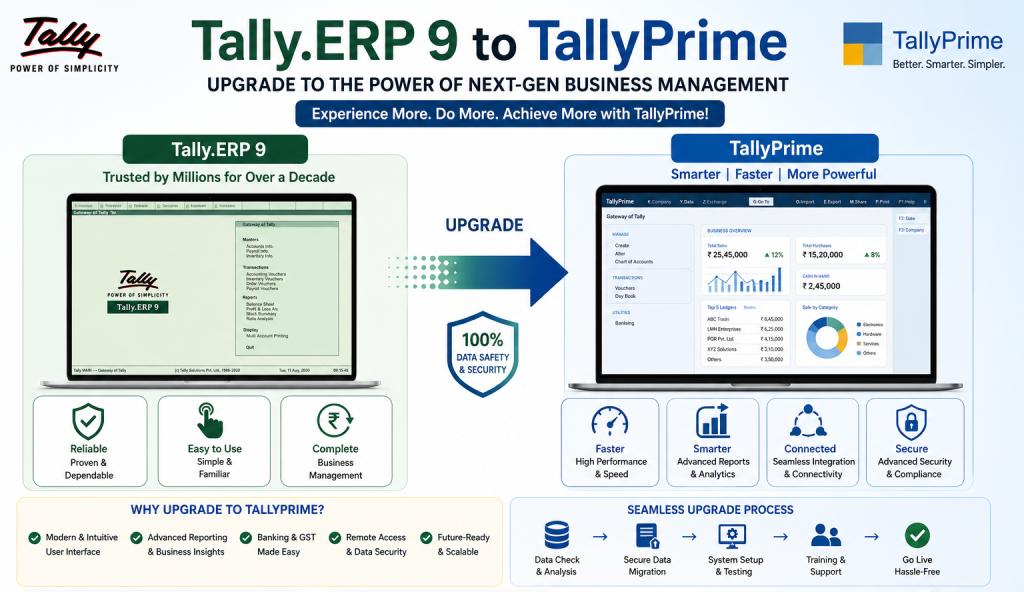
The process of updating Tally ERP 9 to TallyPrime will provide businesses with a number of advantages and tools that will assist them in becoming more productive. This update is important for businesses in Meerut that have a high volume of transactions and require greater accountability.
Some of the advantages of Tally Prime include;
- Simplified user interface
- Enhanced reporting capabilities
- Greater speed for completing transactions
- Ability to easily view a report from multiple locations.
- Tally Prime provides businesses with the ability to create a more streamlined and organized environment.
- Tally Prime also offers businesses the ability to become more accountable.
- Businesses that utilize Tally Prime will be able to track their finances and receive real-time information. This will enable businesses to make more informed decisions.
Advantages of TallyPrime for Meerut Businesses
There are many advantages of TallyPrime for Meerut businesses.
- Increased productivity
- Real-time business insights
- GST compliance
- Multi-tasking made easy
- Better control and security
Steps for Upgrading from Tally ERP 9 to TallyPrime
To begin the upgrade process, there are a number of steps that must be completed.
Step 1: Check System Requirements
Prior to upgrading to TallyPrime, businesses must first check their system to ensure that they meet the minimum system requirements. These requirements include:
- A stable Windows Operating System
- Adequate RAM
- Adequate storage space
- A stable network connection (for multi-user environments)
Step 2: Create a Complete Backup of Tally ERP 9 Data
- The next step is to create a complete backup of your Tally ERP 9 data. Businesses must store the backup in a secure location.
- This will allow businesses to recover their data if something goes wrong during the Tally migration process.
Step 3: Download TallyPrime
- Next, download the latest version of TallyPrime.
- Ensure that you obtain the software from either the official website or from an authorized Tally dealer in Meerut.
Step 4: Install TallyPrime
- After downloading TallyPrime, install it on your computer.
- You will be prompted to select the installation directory.
- Installation of TallyPrime is typically quick and easy.
Step 5: Load Existing Data
- Once TallyPrime is installed, open TallyPrime and click “Load Company”.
- Then, select the folder where your current Tally ERP 9 data is located.
- TallyPrime will then migrate your existing data into its own format.
Step 6: Migrate Data
- The TallyPrime migration process is automated.
- Click on “Company” > “Migrate Company”.
- Select the company that you want to migrate.
- Then, wait until the migration process is complete.
- The entire migration process should take no more than a few minutes.
Step 7: Verify Data Accuracy
- After migrating your data into TallyPrime, verify the accuracy of your financial data.
- Check your ledger accounts, stock items, and invoices.
- Also, confirm that your GST filings are accurate.
- Verifying your data will give you confidence that your data was migrated properly.
Step 8: Set Up TallyPrime
- Once your data has been verified, customize TallyPrime to fit your business needs.
- Turn on/off features.
- Assign user roles and permissions.
- Set-up GST and tax settings.
Step 9: Train Employees
- Training employees how to use TallyPrime will help them transition quickly.
- Employees will learn how to navigate the new interface.
- They will learn how to use the “Go To” function to locate reports and other functions.
- Employees will learn how to generate reports.
- Typically, professional Tally dealers in Meerut offer employee training and support.
Challenges Associated with Tally Migration and Solutions
While the upgrade process for TallyPrime is typically smooth, some businesses may encounter a few problems during Tally migration.
Data compatibility issues
- Solution: Make sure you are running the most recent version of Tally ERP 9 before migrating.
Network configuration problems
- Solution: Contact a professional for setting up the correct LAN configuration in multi-user environments.
- Solution: Offer employee training.
Errors when verifying data
- Solution: Perform a detailed review of your data after migration.
Why Hire a Professional Tally Dealer in Meerut?
- Although it is possible to do the upgrade process yourself, hiring a professional Tally dealer in Meerut can benefit you in numerous ways.
- Expert guidance through the upgrade process.
- Error-free migration of your data.
- Customization of your TallyPrime set-up for your business.
- Continued technical support.
- Quick resolution of any technical issues.
- If you are looking to do a seamless accounting software upgrade in Meerut, hiring a professional will reduce stress and give you peace of mind.
What New Features in TallyPrime Are You Looking Forward to?
After upgrading, you will be able to take advantage of many of the powerful new features of TallyPrime.
“Go To” Search
- Quickly find reports, vouchers, and functions by entering keywords.
Reports in One Window
- Compare and view multiple reports at once without having to switch windows.
Simplification of Voucher Entry
- Enter vouchers quickly and simply.
Dashboards That Show Insight
- Have a clear picture of your overall business performance.
Reconciliation of Bank Statements
- Reconcile bank statements easily.
TallyPrime for Various Business Types in Meerut
Manufacturers
Manage your inventory, production, and cost effectively.
Retailers
Streamline your billing, stock management, and GST compliance.
Service providers
Track your revenue, expense, and profit.
Traders/Wholesalers
Streamline your bulk transaction and multi-location inventory.
Best Practices for a Seamless Upgrade
To ensure that the upgrade to TallyPrime is seamless, consider the following best practices:
- Always back up your data prior to upgrading.
- Only purchase licensed versions of the software.
- Upgrade outside of work hours.
- Thoroughly test your data after migrating.
- Provide training to your employees so that they can quickly adapt.
- Prepare Your Business for Future Growth with TallyPrime
When you upgrade to TallyPrime, you are getting a lot more than just a new version of accounting software.
- You are giving your business the ability to grow in the future.
- By providing businesses in Meerut with greater efficiency, better reporting, and greater ease of use, TallyPrime gives businesses the ability to remain competitive in the future.
- As digital transformation continues to influence various sectors of the economy, using contemporary accounting software is critical.
- Timing is everything when it comes to ensuring your business is ready for future growth.
- A timely Tally ERP 9 upgrade in Meerut will ensure your business is compliant, productive, and prepared to expand.